

StateGraph to a production endpoint in under 5 minutes.
The production gap
LangGraph gives you a graph-based runtime for building agents. It does not give you the infrastructure to serve them. When you move fromgraph.invoke() in a script to handling real traffic, you run into five missing pieces:
No API layer
No built-in HTTP server. You write FastAPI routes, CORS, request parsing, and streaming yourself. LangServe is deprecated. LangGraph Platform requires a LangSmith account.
No conversation memory
LangGraph supports checkpointers, but you wire up database connections, async lifecycle, and thread ID routing from HTTP requests yourself.
No guardrails
Your agent will process PII, jailbreak attempts, and toxic content unless you build input/output validation from scratch.
No observability
When a production agent returns garbage at 3am, you need traces. LangGraph has no built-in tracing. You instrument it yourself.
astream_events that you need to map to a protocol your frontend understands.
Idun Engine fills all five gaps. Your StateGraph stays unchanged. Idun wraps it into a FastAPI service with AG-UI streaming, configurable memory, guardrails, and multi-provider observability, all configured through a single YAML file.
This guide drives configuration from
config.yaml. The standalone runtime exposes the same fields through the admin panel at /admin/, so any step that edits the YAML can also be done from a browser; the DB is the source of truth in steady state.What you will build
1
Streaming API
A LangGraph agent served as a REST + AG-UI streaming endpoint.
2
Conversation memory
In-memory persistence, upgradeable to PostgreSQL or SQLite.
3
Input guardrails
PII detection that blocks requests before they reach the agent.
4
Observability
Langfuse tracing on every invocation with full LLM call details.
Prerequisites
- Python 3.12+
- A Gemini API key (or any LangChain-compatible LLM)
- 5 minutes
1
Write your LangGraph agent
Create a project directory with an agent that has tool calling built in:Two things matter here:
agent/agent.py
- The variable
workflowis an uncompiledStateGraph. Do not call.compile(). Idun compiles it for you with the configured checkpointer and store. - The state uses
MessagesState(aTypedDictwith a singlemessagesfield). Idun auto-detects this as a chat-mode agent. If your state has additional fields, Idun treats it as a structured-input agent and exposes the full JSON Schema through the capabilities endpoint.
2
Set up Idun and run the agent
Install the engine wheel (it bundles the standalone admin/chat/traces app and the Create That is a complete, valid config. Three fields define your entire setup:You should see:Your agent is now live. Open
idun console script):config.yaml next to your agent directory:config.yaml
type: LANGGRAPHtells Idun which adapter to use.graph_definition: "./agent/agent.py:workflow"points to your file and variable. Format:path/to/file.py:variable_name. Idun dynamically imports it.checkpointer.type: memoryenables in-memory conversation persistence. Every request with the samethread_idcontinues the conversation.
http://localhost:8000/docs to see the full OpenAPI spec, http://localhost:8000/ for the chat UI, and http://localhost:8000/admin/ for the admin panel. To use a different port, export IDUN_PORT before running idun serve.3
Test the agent
The canonical endpoint is You get back a stream of AG-UI events: Or open
POST /agent/run, which implements the AG-UI streaming protocol used by CopilotKit, Vercel AI SDK, and other modern chat frontends.RunStarted, TextMessageStart, ToolCallStart, ToolCallEnd, TextMessageContent (with deltas), TextMessageEnd, RunFinished. Your frontend renders these as they arrive.You can also check capabilities and health:/ in a browser and chat with the agent directly through the bundled chat UI.4
Add your first guardrail
Guardrails validate input and output at the API boundary. They run before and after your agent, blocking requests that violate your policies. Idun uses Guardrails AI validators, downloaded and run locally.Add a Set your Guardrails AI API key and restart:On startup, Idun downloads the guardrail validators from the Guardrails AI Hub and initializes them locally. The first start takes 30-60 seconds while models download. Subsequent starts are instant.Test it by sending a message that contains PII:The request is blocked before it ever reaches your agent. The PII guardrail detected an email address and phone number in the input.Idun supports 15 guardrail types: PII detection, ban lists, toxic language, jailbreak detection, prompt injection, NSFW filtering, bias detection, topic restriction, gibberish detection, competition checks, language validation, code scanning, RAG hallucination detection, Google Model Armor, and custom LLM-based validation.
guardrails section to your config.yaml:config.yaml
5
Add observability with Langfuse
Add an Restart the server. Every invocation now shows up in your Langfuse dashboard with full traces: LLM calls, token counts, latencies, tool executions.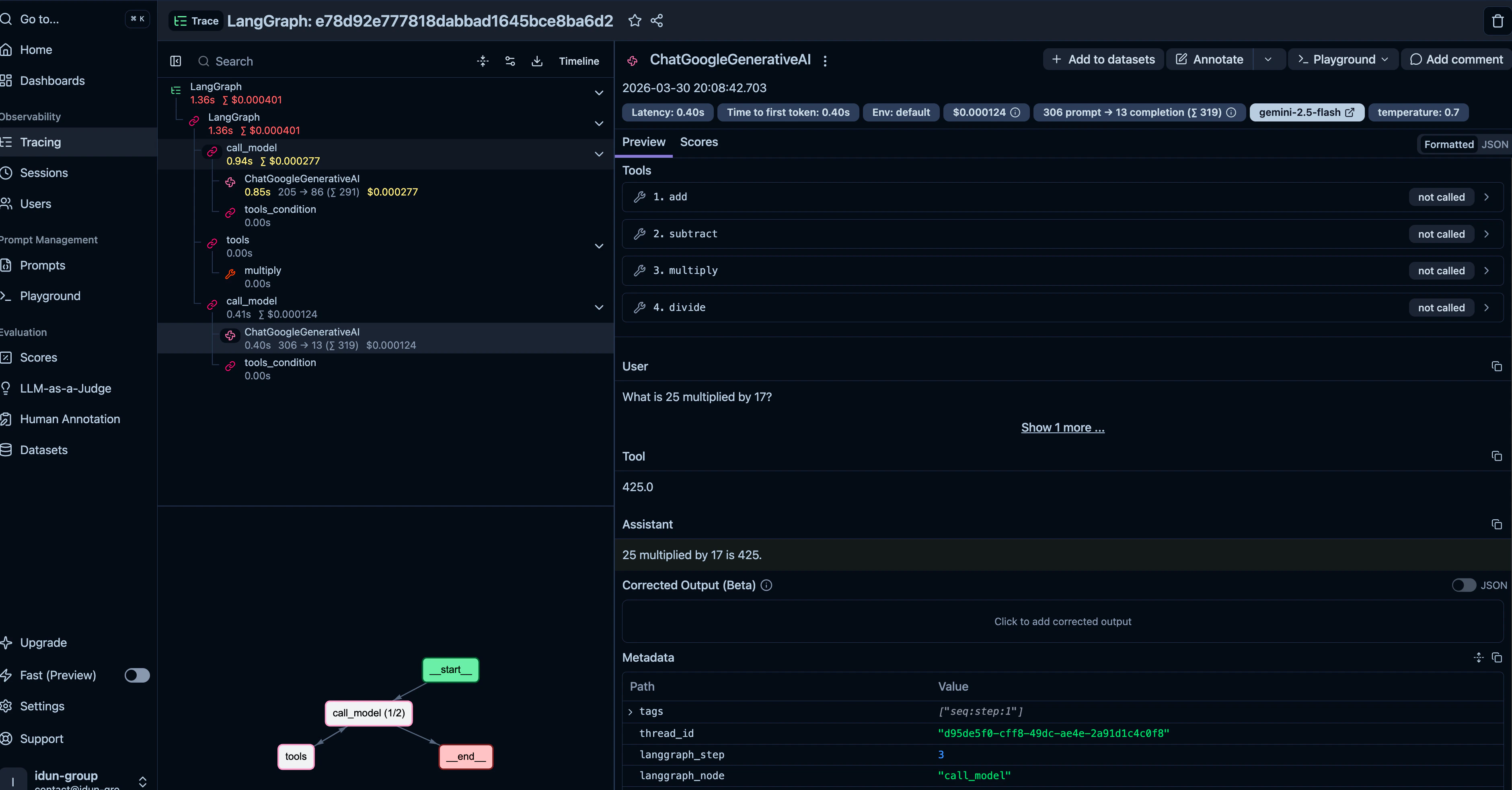
observability section to your config.yaml:The engine fans spans out to every enabled provider; each is lazy-loaded. Independently, the local trace store at
/admin/traces/ always captures every run alongside any external providers you configure; see Local trace store.6
Upgrade to PostgreSQL memory
In-memory checkpointing loses conversations when the server restarts. For production, switch to PostgreSQL:Idun handles the async connection pool, table creation, and lifecycle management. Your agent code does not change.For a simpler persistence option, use SQLite:
7
Connect a frontend
The
/agent/run endpoint implements the AG-UI protocol, which is natively supported by CopilotKit and compatible with any SSE-consuming frontend. The standalone also ships its own chat UI at /, so you can demo and dogfood without writing one. Replace the bundled UI by pointing IDUN_UI_DIR at your own static export; see Customizing the chat UI.Full config.yaml
Here is the complete config file with everything from this guide: agent, guardrails, observability, and PostgreSQL memory. Copy it and adjust the values for your setup.config.yaml
How Idun compares to alternatives
Idun Engine is open source and self-hosted. Your agent code stays yours. The config file is the only coupling, and it is a plain YAML file you can generate from any tool.
Next steps
You now have a production LangGraph agent with streaming, memory, guardrails, and observability. From here:Add MCP tool servers
to give your agent access to external tools via the Model Context Protocol. Add an
mcp_servers section to your config, or use the admin panel at /admin/mcp/.Add SSO/OIDC protection
to require JWT authentication on all agent endpoints. Add an
sso section with your OIDC issuer and client ID.Connect messaging integrations
(WhatsApp, Discord, Slack, Google Chat) to expose your agent on external channels. Each is a config section with provider credentials, or a card at
/admin/integrations/.Manage prompts
with versioning and Jinja2 variables through the admin panel at
/admin/prompts/ or in your YAML.