
Documentation Index

Fetch the complete documentation index at: https://docs.idun-group.com/llms.txt

Use this file to discover all available pages before exploring further.

Guardrails scan agent inputs and outputs to enforce safety and policy boundaries. Idun Engine provides 15 built-in guardrail types powered by Guardrails AI, applied at the input position, output position, or both.

How guardrails work

Guardrails run at two positions in the agent request lifecycle:
  • Input guardrails validate user messages before the agent processes them. If any input guardrail fails, the request is blocked immediately and the agent never sees the message.
  • Output guardrails validate agent responses before returning them to the user. They run after agent processing completes. Output guardrails add latency to the response time.
You can configure multiple guardrails at each position. All guardrails at a given position are checked, and any single failure blocks the request or response.

Configuration

Add guardrails in the guardrails section of your config.yaml. Each guardrail has a config_id that identifies the type and parameters specific to that type.
config.yaml
guardrails:
  input:
    - config_id: "ban_list"
      banned_words: ["spam", "scam", "phishing"]
    - config_id: "detect_pii"
      pii_entities: ["EMAIL_ADDRESS", "PHONE_NUMBER", "CREDIT_CARD_NUMBER"]
    - config_id: "detect_jailbreak"
      threshold: 0.8
  output:
    - config_id: "toxic_language"
      threshold: 0.7
    - config_id: "gibberish_text"
      threshold: 0.8
Infrastructure fields (api_key, guard_url, reject_message) are populated automatically. For YAML-based configs the api_key is read from the GUARDRAILS_API_KEY environment variable. You only need to specify the config_id and guard-specific parameters.
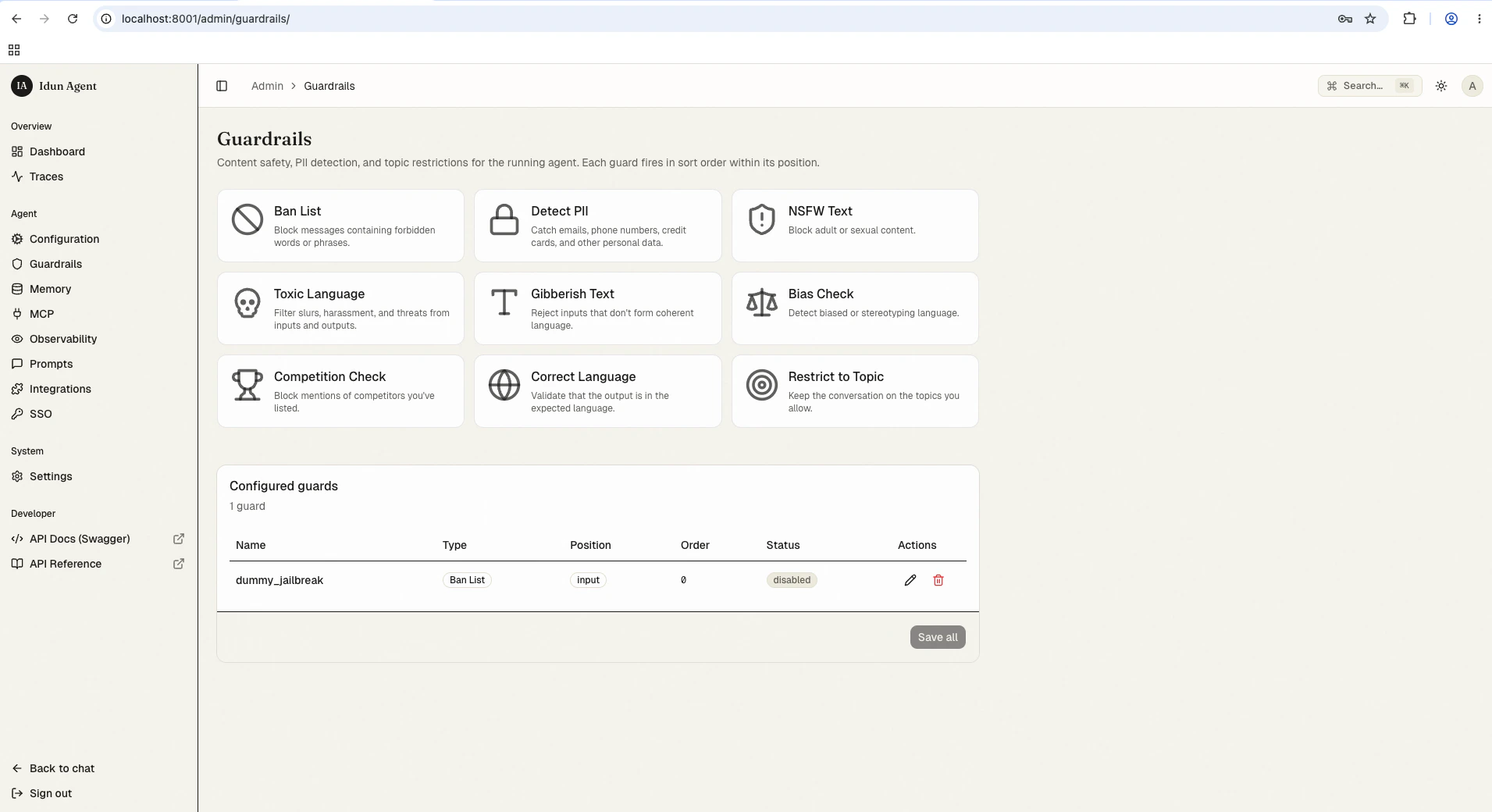
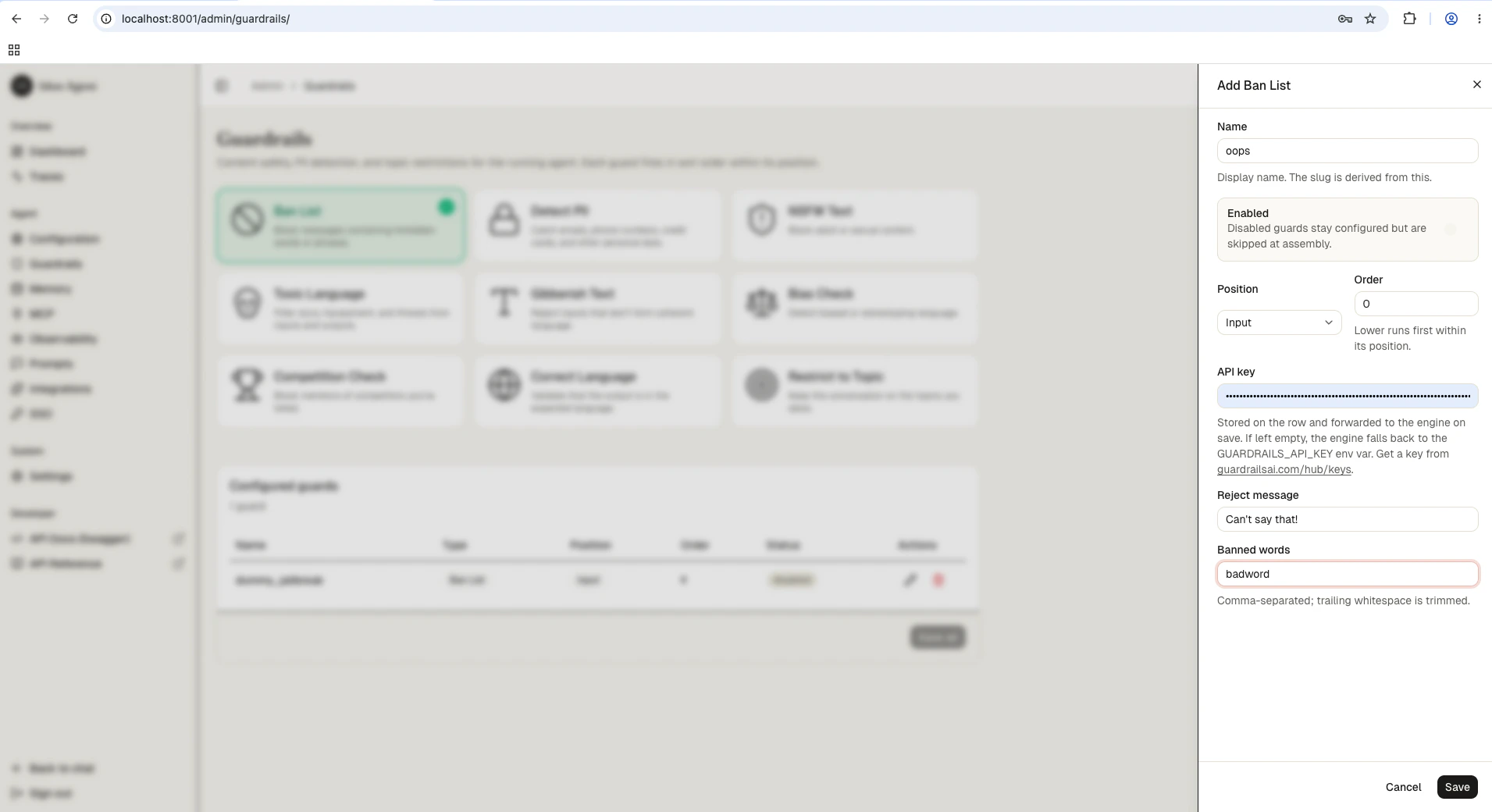
Guardrails need a Guardrails AI API key. Either set it once in the admin form on your first guardrail (the standalone persists and re-hydrates it on boot), or export it as GUARDRAILS_API_KEY in your environment. Get a key from Guardrails AI.

Available guardrail types

All 15 guardrail types and their key parameters:
config_idDescriptionKey parameters
ban_listBlock specific words or phrasesbanned_words (list of strings)
detect_piiDetect personally identifiable information (emails, phone numbers, addresses)pii_entities (list of PII types)
nsfw_textBlock sexually explicit or violent contentthreshold (0.0 to 1.0)
toxic_languageDetect toxic or offensive languagethreshold (0.0 to 1.0)
detect_jailbreakIdentify attempts to bypass safety guidelinesthreshold (0.0 to 1.0)
prompt_injectionDetect prompt injection attacksthreshold (0.0 to 1.0)
competition_checkBlock mentions of competitor names or productscompetitors (list of strings)
bias_checkDetect biased languagethreshold (0.0 to 1.0)
correct_languageVerify text is written in expected languagesexpected_languages (ISO codes, e.g. ["en", "fr"])
restrict_to_topicKeep conversation within defined subject areastopics (list of allowed topics)
gibberish_textFilter nonsensical or incoherent outputthreshold (0.0 to 1.0)
rag_hallucinationDetect hallucinated content in RAG responsesthreshold (0.0 to 1.0)
code_scannerValidate code blocks for allowed programming languagesallowed_languages (list of language names)
model_armorGoogle Cloud Model Armor integrationproject_id, location, template_id
custom_llmDefine custom validation rules using an LLMmodel, prompt

Adding guardrails through config file

For first-boot seeding (or engine-only mode), add guardrails directly to your config.yaml:
config.yaml
guardrails:
  input:
    - config_id: "ban_list"
      banned_words: ["competitor-product", "internal-codename"]
    - config_id: "detect_pii"
      pii_entities: ["EMAIL_ADDRESS", "PHONE_NUMBER"]
Each guardrail entry supports an optional reject_message field to customize the error message returned when the guardrail triggers:
guardrails:
  input:
    - config_id: "ban_list"
      banned_words: ["blocked-term"]
      reject_message: "Your message contains a restricted term."

Testing guardrails

After configuring guardrails, verify they work as expected by sending test requests through the API.
curl -X POST http://localhost:8008/v1/agents/{agent_id}/query \
  -H "Content-Type: application/json" \
  -H "Authorization: Bearer {api_key}" \
  -d '{"message": "My email is john.doe@example.com and phone is 555-0123"}'
When a guardrail blocks a request, the response includes the guardrail field identifying which guard triggered and a detail message explaining why.

Best practices

  • Layer multiple guardrails at the input position for defense in depth. Combine ban lists with PII detection and jailbreak prevention.
  • Use output guardrails sparingly since they add latency. Reserve them for critical checks like hallucination detection or gibberish filtering.
  • Set thresholds conservatively at first (higher values = stricter), then lower them if you see too many false positives.
  • Test with realistic inputs before production. Send messages that should trigger each guardrail and verify legitimate content passes through.

Next steps

Guardrails reference

All 15 guardrail types and their configuration fields.

Observability

Monitor guardrail activity in traces.

Deployment

Deploy your agent to Cloud Run, a VM, or your laptop.
Last modified on May 26, 2026